- Home Page /
- Office Products /
- Office Electronics /
- Printers & Accessories /
- Computer Printers /
- Canon PIXMA TR4720 All-in-One Wireless Printe...
0 ratings




Item #:
223865122
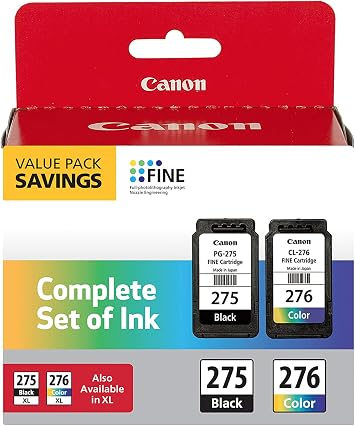
Canon PIXMA TR4720 All-in-One Wireless Printer, Black & PG-275/CL-276 Multi Pack & CL-276XL AMR
Item #:
223865122
USD 186
Price Details
Excluding Shipping & Custom charges ( Shipping and custom charges will be calculated on checkout )
*All items will import from US
23%
0 ratings
Write a review
In stock
 Imported from USA store
Secured transaction
Ubuy works hard to protect your security and privacy. Our advanced payment security system ensures confidentiality by encrypting your information during transmission using AES (Advanced Encryption Standards) and SSL (Secure Socket Layer) protocols. Your payment details are 100% secure as we do not share your payment details with third party sellers.
Our Top Logistics Partners


Choose this Canon all-in-one inkjet printer to make sure you can get your work done.
This bundle contains 3 items



Fast
Shipping

Free
Return*

Secure Packaging

100% Original Products

PCI DSS Compliance

ISO 27001 Certified



What Stands Out
All-in-One Functionality
The Canon PIXMA TR4720 combines printing, scanning, and copying in one compact device, perfect for home and office use, addressing various needs without requiring multiple machines.
Wireless Connectivity
Enjoy hassle-free printing with built-in Wi-Fi, allowing users to print from various devices, including smartphones and tablets, enhancing convenience and accessibility.
Multi-Pack Convenience
The included PG-275/CL-276 multi-pack simplifies purchasing, providing essential ink cartridges while ensuring high-quality prints with vibrant colors and sharp text for all your printing tasks.
Product Details
| Printer Type | Inkjet |
| Other Special Features of the Product | Wireless |
| Printer Output Type | Color |
| Controller Type | Push Button |
| Print media | Glossy photo paper |
| Scanner Type | Sheetfed |
| Maximum Copy Speed Black and White | 8.8 pages_per_minute |
| Compatible Devices | Smartphones |
| Ink Color | Color |
| Additional Printer Functions | All In One |
| Control Method | App |
| Compatible Cartridge | Canon |
| Number of Trays | 1 |
| Resolution | 4800 x 1200 |
| Color | Black |
| Color Depth | 1 bpp |
| Maximum print Resolution Color | 4800 x 1200 dpi |
| Maximum Print Resolution Black and White | 4800 x 1200 dpi |
| Duplex | Automatic |
| Brand | Canon |
| Model Name | Canon_PIXMA |
| Model Number | TR4720 |
| Built-In Media | Printer, Ink Cartridges |
| Model Series | PIXMA |
| Specific Uses For Product | Office |
| Unit Count | 1 Count |
| Color Pages per Minute | 4.4 pages_per_minute |
| B&W Pages per Minute | 4.4 pages_per_minute |
| Maximum Media Size | 4" x 6" (10.2 cm) |
| Maximum Sheet Capacity | 100 |
| Paper Size | 4 inches (10.2 cm) |
| Printer Connectivity Type | Wi-Fi |
| Hardware Interface | USB |
| Maximum Copy Resolution Color | 4800 x 1200 dpi |
| Maximum Copy Resolution Black and White | 4800 x 1200 dpi |
| Connectivity Technology | Wi-Fi |
| Printing Technology | Inkjet |
| Special Feature | Wireless |
| Printer Output | Color |
| Maximum Print Speed (Color) | 4.4 pages_per_minute |
| Max Printspeed Monochrome | 4.4 pages_per_minute |
| Item Weight | 11 lbs (4.99 kg) |
What's in the box
Printer, Ink Cartridges
Who Should Buy?

-
Home Office Users
Ideal for remote workers needing reliable printing, scanning, and copying capabilities in a compact space.
-
Students
Great for students producing assignments and projects, offering wireless printing for convenience and easy access.
-
Small Business Owners
Well-suited for small businesses needing versatile functions like printing invoices and scanning documents efficiently.

-
High Volume Users
Not ideal for those who require heavy-duty printing, as ink cartridges may need frequent replacement.
Product Description
Have any Query? Chat with us
Customer Questions & Answers
-
Question:
What are the main features of the Canon PIXMA TR4720 printer?
Answer: The Canon PIXMA TR4720 is an all-in-one wireless printer that excels in versatility and functionality. It offers printing, scanning, copying, and faxing capabilities in a compact design. With wireless connectivity, you can print directly from your smartphone or tablet using the Canon PRINT app or AirPrint. The printer also supports automatic duplex printing which saves paper and enhances productivity. Ideal for home offices or small businesses, it balances high-quality color documents with a user-friendly interface. -
Question:
How do I connect my Canon PIXMA TR4720 to Wi-Fi?
Answer: To connect your Canon PIXMA TR4720 to Wi-Fi, start by pressing the 'Home' button on the printer's control panel. Navigate to 'Wireless LAN setup' and select 'Easy Setup.' Follow the prompts to choose your Wi-Fi network and enter the password. Once connected, you can print wirelessly from your devices. This feature is especially useful for users who frequently print from a mobile device or laptop without needing a physical connection. -
Question:
What type of ink does the Canon PIXMA TR4720 use?
Answer: The Canon PIXMA TR4720 uses PG-275 and CL-276 ink cartridges. The PG-275 is a black ink cartridge, while the CL-276 is a tri-color cartridge that combines cyan, magenta, and yellow. For users requiring higher volume printing, the CL-276XL is also available. Utilizing these cartridges ensures high-quality prints with vibrant colors and sharp text, making it suitable for both document printing and photo projects. -
Question:
Can the Canon PIXMA TR4720 print photos?
Answer: Yes, the Canon PIXMA TR4720 is capable of printing high-quality photos, thanks to its color ink system which produces vivid and detailed prints. You can print 4x6 inch photos directly from your computer or mobile device. This feature is perfect for photography enthusiasts or anyone wanting to create personalized gifts, scrapbooks, or keepsakes. Using Canon's photo paper will further enhance the quality of your prints. -
Question:
Does the Canon PIXMA TR4720 support mobile printing?
Answer: Absolutely! The Canon PIXMA TR4720 supports various mobile printing options including Apple AirPrint and Google Cloud Print. You can print directly from your iPhone, iPad, Android device, or laptop without needing to install additional drivers. This makes it incredibly convenient for users who are often on the go or want to print documents and photos quickly from their mobile devices. -
Question:
What is the print speed of the Canon PIXMA TR4720?
Answer: The Canon PIXMA TR4720 has a print speed of approximately 8.8 pages per minute for black and white documents and around 4.4 pages per minute for color prints. This speed is adequate for home office use or light business environments. Users who need to produce multiple documents will find this printer efficient for everyday tasks like printing reports, presentations, and personal documents. -
Question:
Can I use third-party ink cartridges with the Canon PIXMA TR4720?
Answer: While third-party ink cartridges may be compatible with the Canon PIXMA TR4720, using Canon’s genuine inks is recommended for optimal performance and print quality. Genuine cartridges are designed to work seamlessly with the printer and can enhance the longevity of the printer components. Many users prefer to stick with manufacturer-recommended inks to avoid potential issues with print quality and reliability. -
Question:
How do I set up the Canon PIXMA TR4720 printer?
Answer: Setting up the Canon PIXMA TR4720 is straightforward. After unpacking the printer, you need to install the ink cartridges and load paper into the tray. Connect the printer to your Wi-Fi network via the control panel and download the Canon PRINT app on your mobile device to complete the setup. The user-friendly interface guides you through the installation process. This makes the printer ready for immediate use whether you're printing, scanning, or copying. -
Question:
What is the recommended paper type for the Canon PIXMA TR4720?
Answer: For optimal performance, the Canon PIXMA TR4720 works best with Canon’s own inkjet paper, particularly for photo prints and documents. However, it can also handle a variety of paper types including plain paper, envelopes, and labels. Choosing the right paper type enhances the resolution and vibrancy of your prints, particularly for color images, ensuring high-quality output for every project. -
Question:
Where can I buy the Canon PIXMA TR4720 All-in-One Wireless Printer?
Answer: You can purchase the Canon PIXMA TR4720 All-in-One Wireless Printer, Black & PG-275/CL-276 Multi Pack & CL-276XL AMR from Ubuy in Micronesia. Ubuy offers a convenient online shopping experience, allowing you to easily find, compare, and buy this versatile printer along with its compatible ink cartridges. With Ubuy, you can ensure you are getting authentic products and have access to a range of customer service options.
Canon Printers TR4720 Editorial Review


The Canon PIXMA TR4720 All-in-One Wireless Printer has garnered a generally positive reception from customers, particularly praising its ease of setup and functionality across multiple devices. Users have found the printing quality to be satisfactory, with reports of vibrant colors, particularly useful for personal projects like greeting cards. Many long-time Canon users have expressed their continued satisfaction, emphasizing that the brand's reliability keeps them coming back. While most feedback highlights the printer's effectiveness and user-friendly features, there are some concerns regarding the longevity of the ink that comes with the printer. Several users have noted that the initial ink supply depletes quickly, which creates a potential inconvenience for those expecting to immediately engage in extensive printing. However, the printer is noted for its fast performance, making it suitable for both casual users and those with more frequent printing needs. Overall, the Canon PIXMA TR4720 appears to be a solid choice for customers seeking an affordable, dependable wireless printing solution, albeit with some caution about ink usage. **
Customer Reviews & Ratings
73 customers ratings
-
5 Star
65%
-
4 Star
18%
-
3 Star
7%
-
2 Star
4%
-
1 Star
6%
Review this product
Share your thoughts with other customers
Pros
- Easy to set up and use
- Good printing quality, especially for vibrant color projects
- Compatible with desktop and mobile devices
- Fast printing speed
- Affordable price point
- Reliable brand reputation
Cons
- Ink that comes with the printer tends to run out quickly
Platform Trust & Buyer Confidence

MA
Mohammad
Verified buyer
“Excellent quality and original too,when ubuy send original things I will appreciate that ,I very satisfied thank you”
23 July 2026 · via Trustpilot
CK
Chitra
Verified buyer
“The order and delivery progress was communicated very well. Package arrived within the estimated time. Products arrived as expected in good condition.”
22-Jul-26 · via Trustpilot
K
kund
Verified buyer
“Good supply of products. Safe payment methods, and shipment worldwide! Genuine products.”
23-Jul-26 · via Trustpilot
OO
Onesi
Verified buyer
“Was my first time buying a product from Ubuy, but I found it so helpful. This is reliable. Gonna place a new order!”
22 July 2026 · via Trustpilot
SJ
SAO JOHN
Verified buyer
“Ubuy is a great online platform to buy stuff. Reliable, fast delivery time and great value for money. I've been using Ubuy online shopping platform for three years now and will continue to do so.”
23 July 2026 · via Trustpilot
Secure Checkout
Global Delivery
Easy Returns
Genuine Products
Product Price History
Important information
- Limitations : For products shipped internationally, please note that any manufacturer warranty may not be valid; manufacturer service options may not be available; product manuals, instructions, and safety warnings may not be in destination country languages; the products (and accompanying materials) may not be designed in accordance with destination country standards, specifications, and labeling requirements; and the products may not conform to destination country voltage and other electrical standards (requiring use of an adapter or converter if appropriate). The recipient is responsible for assuring that the product can be lawfully imported to the destination country. When ordering from Ubuy or its affiliates, the recipient is the importer of record and must comply with all laws and regulations of the destination country.
- Not all the products listed on Ubuy are for sale, as Ubuy is a global search engine. Products are subject to export/trade regulations.
USD 186
Order now and get it around Wednesday, August 26
This item is not restrict in my country.(Please click on above link if this item is not restrict in your country, So our team will review and allow.)
QTY:
Secured transaction
PCI DSS compliant and ISO 27001:2022 certified, with encrypted payments and full buyer protection on every order.
Our Top Logistics Partners
Fastest cross-border delivery
Features & Benefits
- All-in-one functionality for versatile use.
- Wireless printing enables convenient mobile printing options.
- Paper tray capacity of 100 sheets for improved productivity.
- Print speed of up to 8.8 pages per minute in black.
- High resolution printing at 4800 x 1200 dpi for exceptional quality.
- Features borderless photo printing and auto duplex printing.
Ubuy Assurance
Experience worry-free shopping with 100% original products, PCI DSS-compliant payment security, ISO 27001-certified data protection, the fastest cross-border delivery, free returns *, and secure packaging on every order.