- Home Page /
- Electronics /
- Camera /
- Camera Accessories /
- Camera Batteries & Chargers /
- Adapters /
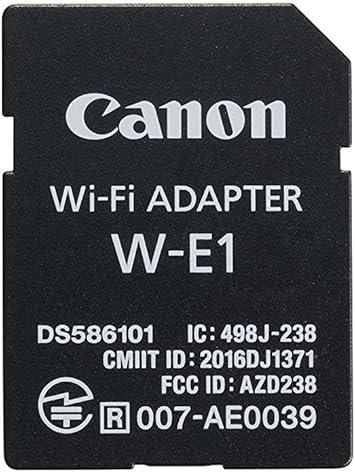
- Canon Wi-Fi Adapter W-E1
0 ratings

Item #:
1936668
Canon Wi-Fi Adapter W-E1
Item #:
1936668
USD 54
Price Details
Excluding Shipping & Custom charges ( Shipping and custom charges will be calculated on checkout )
*All items will import from US
0 ratings
Write a review
Out of stock
 Imported from USA store
Secured transaction
Ubuy works hard to protect your security and privacy. Our advanced payment security system ensures confidentiality by encrypting your information during transmission using AES (Advanced Encryption Standards) and SSL (Secure Socket Layer) protocols. Your payment details are 100% secure as we do not share your payment details with third party sellers.
Our Top Logistics Partners


Wi-Fi capability provides easy transfer of images and videos, as well as remote shooting and quick setting changes for Canon EOS 7D Mark II, EOS 5DS and EOS 5DS R digital SLR cameras.

Fast
Shipping

Free
Return*

Secure Packaging

100% Original Products

PCI DSS Compliance

ISO 27001 Certified


What Stands Out
Wireless Connectivity
The Canon Wi-Fi Adapter W-E1 enables seamless wireless transfer of images and videos from your camera to smart devices, enhancing convenience for photographers on the go.
Easy Setup
With straightforward installation, the W-E1 allows users to quickly connect their Canon cameras to Wi-Fi networks, eliminating complex configurations and saving valuable time.
Remote Shooting
This adapter supports remote shooting via mobile devices, giving photographers greater flexibility and control over their photography, enabling creative shots from various angles.
Product Details
- SD card-shaped Wi-Fi* accessory designed for use with EOS 7D Mark II, EOS 5DS, and EOS 5DS R Digital SLR cameras
- Enables easy image and video transfer to compatible smartphones or tablets (EOS 7D Mark II only)
- Facilitates Wi-Fi capability with a computer using EOS Utility for remote shooting and image transfer
- Allows remote operation with adjustment of camera settings and focus up to 32.8 feet away
- Supports Wi-Fi standards of 802.11b/g/n at 2.4GHz for fast and reliable communication
- Enables wireless SLR operation directly from a computer using Canon's EOS Utility software
| Package Weight | 1 Pound |
Who Should Buy?

-
Photographers
Ideal for photographers wanting to transfer images quickly to devices wirelessly after long shoots.
-
Remote Shooters
Perfect for users who need to control their camera remotely for wildlife or events without being nearby.
-
Social Media Users
Beneficial for users who frequently post photos online directly from their camera to social media platforms.

-
Budget-Conscious Buyers
May not be suitable for individuals looking for low-cost alternatives for wireless connectivity solutions.
-
Non-Canon Users
Users of non-Canon cameras will find this adapter incompatible and thus unusable.
-
Casual Photographers
Not ideal for casual users who rarely transfer images or require advanced connectivity features.
Product Description
Canon Wi-Fi Adapter W-E1
Have any Query? Chat with us
Customer Questions & Answers
-
Question:
What is the Canon Wi-Fi Adapter W-E1 used for?
Answer: The Canon Wi-Fi Adapter W-E1 is designed to enable wireless connectivity for Canon cameras, allowing users to transfer images and control their cameras remotely. This adapter is particularly useful for photographers who want to share their work instantly or control their camera settings from a distance. By connecting the adapter to a compatible Canon camera, users can take advantage of mobile apps to edit and share photos directly to social media or cloud storage, making it ideal for on-the-go photography. -
Question:
Which Canon cameras are compatible with the W-E1 adapter?
Answer: The Canon Wi-Fi Adapter W-E1 is compatible with several Canon camera models, including select models from the EOS series. It's essential to check your specific camera model's manual or Canon's official website to confirm compatibility. Using this adapter with compatible models enhances their functionality by adding Wi-Fi capabilities, allowing for seamless image transfers and remote shooting. This feature is especially beneficial for travel or event photographers who frequently need to share their images promptly. -
Question:
How does the Canon Wi-Fi Adapter W-E1 enhance my photography experience?
Answer: Utilizing the Canon Wi-Fi Adapter W-E1 significantly enhances your photography experience by providing convenient wireless connectivity. It allows you to transfer images directly to your smartphone, tablet, or computer without cumbersome cables. This adaptability means you can quickly share your photos with clients or on social media right after capturing them. Additionally, remote shooting capabilities allow you to position the camera in unique locations while controlling it from a distance, expanding creative possibilities. -
Question:
Can I use the Canon Wi-Fi Adapter W-E1 in remote locations?
Answer: Yes, the Canon Wi-Fi Adapter W-E1 can be used in remote locations as long as you have a Wi-Fi network available. This is particularly useful for outdoor photographers who work in settings where connectivity is limited. In such cases, you can create a local network using a mobile hotspot, allowing your camera to communicate with your devices without relying on public networks. This ensures you can upload photos or control your camera even in isolated areas, making it excellent for adventure and travel photography. -
Question:
How do I set up the Canon Wi-Fi Adapter W-E1 with my camera?
Answer: Setting up the Canon Wi-Fi Adapter W-E1 involves a few straightforward steps. First, insert the adapter into the camera's compatible slot. Next, access the camera's menu to connect to your Wi-Fi network. Follow the on-screen instructions to connect your camera to a smartphone or tablet through the Canon Camera Connect app. This integration becomes intuitive over time, allowing you to quickly adjust settings or upload images. Mastering this setup enables more efficient workflows during shoots. -
Question:
What benefits does the Wi-Fi Adapter provide for photographers?
Answer: The Wi-Fi Adapter W-E1 offers several benefits for photographers, such as immediate image transfer and remote shooting capabilities. Being able to instantly share photos to social media ensures you keep your audience engaged. Moreover, it allows for more strategic camera placement, enabling unique angles or group shots without needing a photographer in the frame. These features are invaluable for professionals and enthusiasts alike, streamlining the sharing process and enhancing creative opportunities. -
Question:
Is the Canon Wi-Fi Adapter W-E1 suitable for video streaming?
Answer: The Canon Wi-Fi Adapter W-E1 is primarily designed for image transfer and remote control of camera settings rather than video streaming. While you can capture still images wirelessly, live video streaming through the adapter might not be supported on most Canon models. However, for filmmakers looking to control camera settings remotely while shooting, the adapter still provides great benefits. It's ideal to consult your camera’s specifications and manual for specific functionalities related to video. -
Question:
What technical specifications should I know about the W-E1 adapter?
Answer: The Canon Wi-Fi Adapter W-E1 features a compact design that easily integrates into compatible Canon cameras. It adheres to standard Wi-Fi protocols, ensuring reliable connectivity. The adapter requires a compatible camera body with an appropriate slot and a recent firmware version to function correctly. Understanding these specifications can help you avoid compatibility issues, ensuring your setup runs smoothly. Verify your camera’s firmware is updated to take full advantage of the adapter's features. -
Question:
How do I troubleshoot connection issues with the W-E1 adapter?
Answer: If you encounter connection issues with the Canon Wi-Fi Adapter W-E1, start by ensuring both your camera and mobile device are fully charged. Check the Wi-Fi settings on your camera and confirm it is connected to the correct network. If problems persist, reset the adapter and perform a fresh setup. Additionally, ensure that your camera's firmware is updated to the latest version. This troubleshooting ensures a smooth user experience, allowing you to focus on capturing stunning photos. -
Question:
Where can I buy Canon Wi-Fi Adapter W-E1 in Micronesia?
Answer: You can buy the Canon Wi-Fi Adapter W-E1 in Micronesia from Ubuy, which provides a convenient online shopping experience with a variety of options. Ubuy offers a seamless purchasing process, allowing you to find, select, and order the adapter easily from the comfort of your home. It's an excellent choice for those looking for reliability and a straightforward shopping platform for electronic accessories.
Canon Adapters Editorial Review
The SD card-shaped Wi-Fi accessory is designed to make image and video transfer easy for the EOS 7D Mark II, EOS 5DS, and EOS 5DSR Digital SLR cameras. It does not work with other models like the EOS Rebel XS, Canon 60D, 5D Mark III, 5D Mark IV, or D3300 models. It works well for transferring pictures from the camera to a smartphone quickly for social media uploading and quick photo processing. However, it has too many restrictions on use and does not transfer videos from the 7D Mark II.
Customer Reviews & Ratings
1 customers ratings
-
5 Star
100%
-
4 Star
0%
-
3 Star
0%
-
2 Star
0%
-
1 Star
0%
Review this product
Share your thoughts with other customers
Pros
- Easy transfer of images and videos from the EOS 7D Mark II to a compatible smartphone
- Makes image transfer convenient
- Well designed
Cons
- Only works with the EOS 7D Mark II, EOS 5DS, and EOS 5DSR Digital SLR cameras
Product Price History
Important information
- Limitations : For products shipped internationally, please note that any manufacturer warranty may not be valid; manufacturer service options may not be available; product manuals, instructions, and safety warnings may not be in destination country languages; the products (and accompanying materials) may not be designed in accordance with destination country standards, specifications, and labeling requirements; and the products may not conform to destination country voltage and other electrical standards (requiring use of an adapter or converter if appropriate). The recipient is responsible for assuring that the product can be lawfully imported to the destination country. When ordering from Ubuy or its affiliates, the recipient is the importer of record and must comply with all laws and regulations of the destination country.
- Not all the products listed on Ubuy are for sale, as Ubuy is a global search engine. Products are subject to export/trade regulations.
USD 54
Currently unavailable.
We don't know when or if this item will be back in stock.
This item is not restrict in my country.(Please click on above link if this item is not restrict in your country, So our team will review and allow.)
Secured transaction
Ubuy works hard to protect your security and privacy. Our advanced payment security system ensures confidentiality by encrypting your information during transmission using AES (Advanced Encryption Standards) and SSL (Secure Socket Layer) protocols. Your payment details are 100% secure as we do not share your payment details with third party sellers.
Our Top Logistics Partners
Fastest cross-border delivery
Features & Benefits
- Wi-Fi capability
- Easy transfer of images and videos
- Remote shooting of still photos
- Quick setting changes
- Compatible with EOS 7D Mark II, EOS 5DS and EOS 5DS R digital SLR cameras
- Enables easy transfer of images and videos with a computer using EOS Utility